Give your AI tool a wireframe, not a guess.
Included in every Balsamiq Cloud plan and the free trial. Listed in Claude's connector directory.
Works both ways.
Create wireframes from a chat
Describe a screen, paste your requirements, attach a screenshot, or point it at your codebase. Your AI tool builds the wireframe right in your Balsamiq project, ready to edit. In Claude and ChatGPT you see it right in the conversation.
Build from what you agreed on
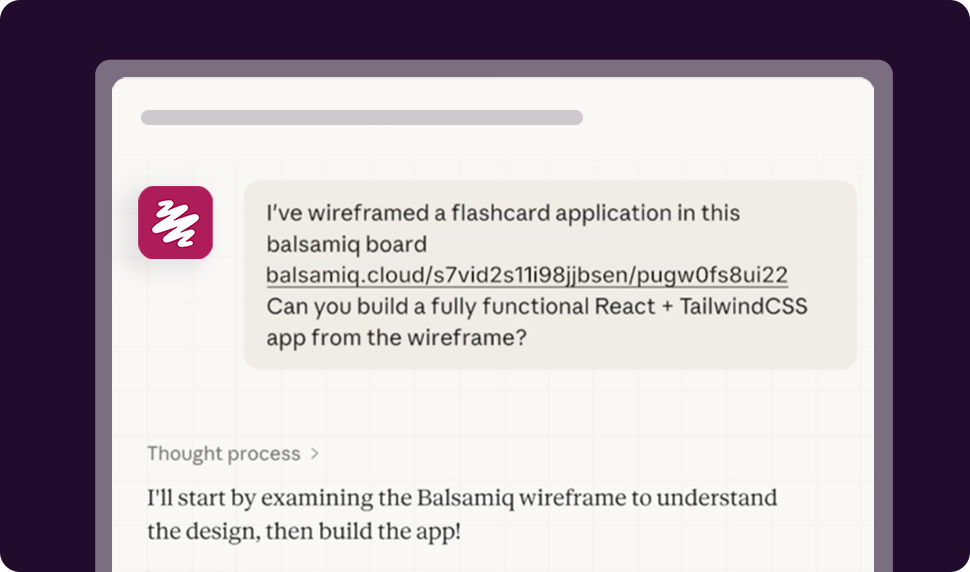
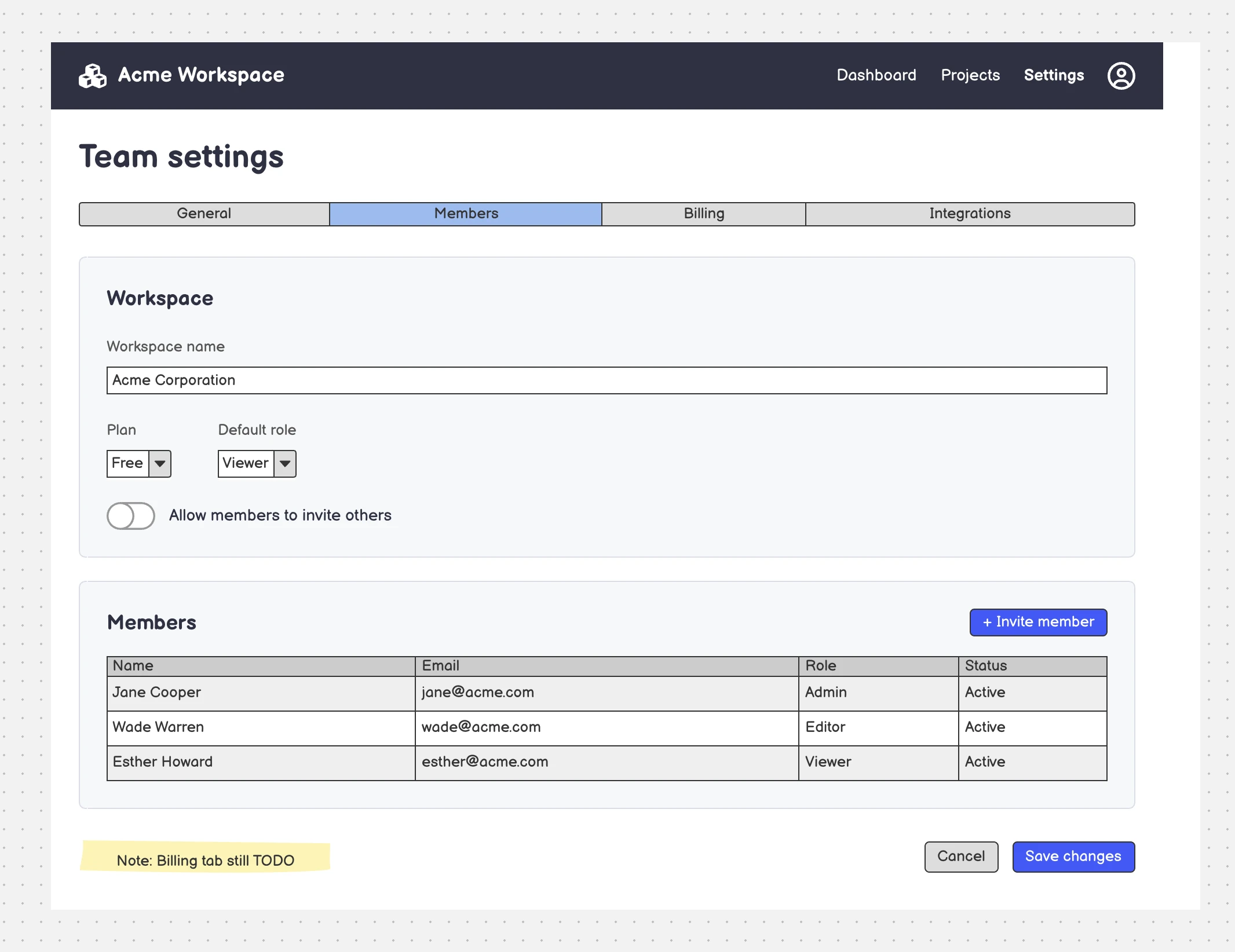
Paste a board or project link. Your AI tool reads every screen, control, note and comment, then writes the code, the stories or the test plan from the design, not from memory.
You: here's the signup flow we agreed on → balsamiq.cloud/b/aX9...
Claude: Reading the project. 5 boards, 2 sticky notes about validation, 3 open comments. Want user stories first, or a working build?
You: both, and flag any missing states
Building from your wireframes...
What people ask it to do
Type it the way you'd say it. These are real prompts: paste one into your AI tool once it's connected.
Turn requirements into a first wireframe
Get visual on what you're about to build, minutes after you write the spec.
Here are my requirements and a screenshot of the current screen. Wireframe the new version in my Balsamiq project, one board per screen.
Turn a screenshot into a wireframe
Rebuild any app or website as a clean, editable low-fi wireframe.
Create a new board named "Login screen" and build a wireframe that mirrors the screenshot I've attached.
Try three layouts side by side
Compare directions before anyone gets attached to one.
Recreate the attached dashboard as a wireframe labeled "Base". To the right, add three variations, A, B and C, with the same content and different layouts.
Show every state of a screen
Empty, error, loading: the states that are easy to forget until QA finds them.
Make wireframes of every state of the Download dialog.
Build a working prototype from a board
Hand your coding tool a design it can read exactly, not a description.
Build a working HTML prototype from this board: [your board URL]
Turn boards into user stories
A backlog ready for Jira, Linear, or wherever your team tracks work.
Generate user stories from the boards in this project: [your project URL]
Write a QA plan before the code
Know what to test before a single line is written.
Generate a QA test plan for this board: [your board URL]
Check the design against your PRD
Find what the spec asks for and the wireframes don't show.
Here's our PRD: [paste it]. Does this board cover everything in it? What's missing? [your board URL]
Review a board like a teammate
Get feedback on flow and copy as comments, right on the board.
Review the copy on this board and leave a comment wherever a label or error message is unclear: [your board URL]
Low-fi on purpose. Even for AI.
AI tools jump straight to pixels and code. A Balsamiq wireframe is the step in between: rough enough that people argue about the idea, not the colors, and structured enough that your AI tool reads it exactly. Agree on the wireframe, then let Claude or Cursor build it.
- Structured, not a screenshot. Your AI tool gets the controls, text, layout, notes and comments, not pixels to guess from.
- Anyone can edit it. No design skills needed to fix what the AI got wrong.
- One source of truth. Your team and your AI tool work from the same picture.
Works with the AI tools you already use
Any client that supports remote MCP servers can connect.
Set it up in about a minute
Step 1
Add the server to your AI tool
Add this URL as a custom connector or MCP server:
https://bais.balsamiq.com/mcp
In Claude, you can also add Balsamiq from the connector directory, with no URL to paste.
Step 2
Sign in to Balsamiq
Your AI tool opens a Balsamiq sign-in page. Sign in and allow access to your projects. No API keys, nothing to install.
Step 3
Ask away
Ask for a wireframe, or paste a board link and ask what to do with it. Your AI tool picks the right Balsamiq tools by itself.
Secure by design
Nothing to install
It's a remote server. Your AI tool connects to it over HTTPS.
OAuth sign-in
No keys to share. Revoke access anytime from Connected apps in your Balsamiq settings.
Only your projects
It works with the projects you can open. It can't see billing or account settings.
No copies kept
To stay fast, the server caches board content for an hour at most, then discards it.
No AI credits
The AI runs in your tool, so the MCP server doesn't use your Balsamiq AI credits.
SOC 2 Type II
Our security policies and controls meet the highest industry standards.
MCP server FAQs
What's an MCP server?
MCP (Model Context Protocol) is an open standard that lets AI tools use outside services. The Balsamiq MCP server is how Claude, ChatGPT, Cursor and other AI tools read and edit your Balsamiq projects.
Which AI tools work with it?
Any client that supports remote MCP servers, including Claude, Claude Code, ChatGPT, Codex, Cursor, VS Code, GitHub Copilot, Gemini CLI and OpenCode. The setup guide links to the instructions for the most common ones, and explains how to add the server to any other.
Do I need a paid plan?
No. It works in the 14-day free trial: reading your boards is unlimited, and creating or editing boards and adding comments is limited to 100 calls a day. On any paid plan, it's unlimited.
Does it use my Balsamiq AI credits?
No. The AI runs in your own tool, so the MCP server doesn't use AI credits.
Does it work with Balsamiq for Desktop, Jira or Confluence?
No, it works with Balsamiq Cloud projects.
How is it different from Balsamiq AI?
Balsamiq AI is the assistant inside the Balsamiq editor. The MCP server lets the AI tool you already use work with your Balsamiq projects. Use both.
Do you train AI models on my data?
No. Balsamiq never uses your data to train AI models. Your AI tool's own terms cover what it does with the content it reads. Learn more in our Privacy Policy.
Give your AI tool something worth building.
Start your free trial and connect your AI tool in a minute.
No credit card required