Features Prototypes Balsamiq AI Wireframes
For PMs For founders For consultants For IT
Customer stories
Pricing
Resources
Help Center Examples gallery Getting started Blog
Log in Try it free
Try it free
  • Product
    • Features
    • Prototypes
    • Balsamiq AI
    • Wireframes
  • Use cases
    • For PMs
    • For founders
    • For consultants
    • For IT

    • Customer stories
  • Pricing
  • Resources
    • Help Center
    • Examples gallery
    • Getting started
    • Blog
Log in Try it free
Back to Help Center
Help Center
  • Getting started
  • Creating and editing
  • Sharing and collaborating
    • Sharing and reviewing
    • Collaborative editing
    • Exporting
    • Importing
      • Importing wireframes from another Balsamiq project
      • Importing a project to Balsamiq
      • Importing images
    • Full Screen Presentation Mode
  • Integrations
  • Account Management
  • Plans and billing
  • Troubleshooting FAQs

Importing images

You can import images to your project in a few different ways: drag them from your computer to the editor, use the images panel, use the project menu...
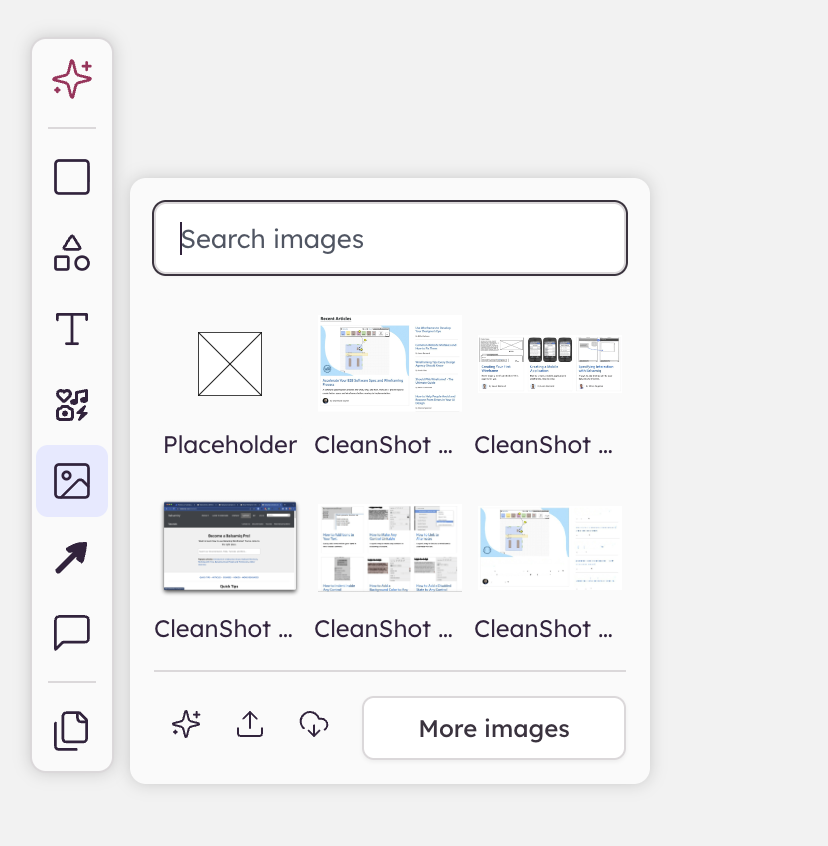
images panel in the left bar

To learn more about importing images, check our Using Images and Icons.


Balsamiq Logo
  • Features
  • Balsamiq AI
  • Pricing
  • Prototypes
  • Wireframes
  • Changelog
  • Server status
  • For PMs
  • For founders
  • For consultants
  • Balsamiq for Desktop
  • Balsamiq for Confluence
  • Balsamiq for Jira
  • Help Center
  • Examples gallery
  • Balsamiq vs other tools
  • Customer stories
  • Blog
  • Good Product Club
  • Balsamiq Academy
  • About us
  • Research program
  • Balsamiq for nonprofits
  • Brand assets
  • Legal & security
GDPR Logo GDPR COMPLIANT SOC2 Logo SOC2 COMPLIANT

© 2008- Balsamiq · Privacy · Terms · Cookie Preferences